
Product Description
Created for today's fast-paced mobile landscape, the sleekly lightweight Palm TX handheld keeps you connected to your most important data--from email to files stored on your office PC--while you're away from your desktop with built-in Wi-Fi and Bluetooth wireless connectivity. It also features a high-resolution 320 x 480-pixel screen (with portrait and landscape orientation modes), a fast Intel 312 MHz ARM-based processor, expansion slot for Secure Digital (SD), MultiMedia (MMC), and Secure Digital I/O (SDIO) cards. The 128 MB of non-volatile flash memory (of which approximately 100 MB is available for files and software) protects your documents and information, even if the device is not charged and the power runs down. And, of course, the Palm TX features Palm's suite of information management applications, the ability to edit Word- and Excel-compatible files, and synchronization with Microsoft Outlook (Windows only). Built-in Wi-Fi and Bluetooth Wireless ConnectivityStay connected easily when you're on the go with the built-in Wi-Fi wireless connectivity (802.11b), which enables you to access email and browse the Web at hotspots such as at coffee shops and in airports, or in your office if you have a wireless LAN network. You can even retrieve documents from your main computer with the included WiFile LT software. The Palm TX also comes the following enhancements:
- Added ability for the device to scan for available networks
- Improved connection logic to automatically connect to available compatible networks
- Three steps to easily set up a new network connection
- A free 30-day subscription to all T-Mobile Wi-Fi hotspots
Expansion Capabilities
The expansion card slot for MMC, SD and SDIO formats lets you insert a memory card from a digital camera and view photos on the large, color display; you can even can add transitions between photos and present them as a slideshow. The Palm TX handheld's compatibility with SD Cards up to 2GB lets road warriors carry a few favorite home videos and be entertained on long trips.
Support for Word, Excel, PowerPoint and PDF files
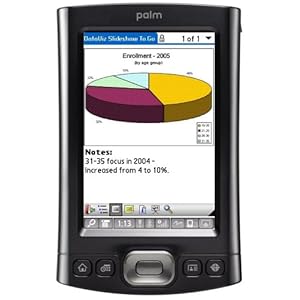
With the included DataViz Documents To Go software, you rehearse your PowerPoint presentation discreetly in an airport, make last-minute changes to a Word document, and check the numbers in an Excel spreadsheet and update them on the spot. The Palm TX comes with support for native Word, Excel, and PowerPoint files. And with the included Adobe Reader for Palm OS, you can download and view converted Acrobat files.
Multimedia
The Palm TX comes bundled with Pocket Tunes MP3 player for playing music files or Podcasts, which allows you to create and edit play lists, shuffle songs and navigate by album, artist or genre. The Palm TX also includes built-in software for viewing digital photos and video clips. And with MobiTV software (sold separately), you can view a wide range of television programs, including news, sports and entertainment, directly on the Palm TX handheld.
Operating System and Software
Veteran Palm OS handheld users will immediately notice the new Favorites view, which provides easy access to applications, files, and folders. The installed Palm OS 5.4 also introduces the Files application, which enables easy navigation among folders and files. It uses the intuitive and easy-to-learn Graffiti 2 writing software to input data into the handheld (as well as an on-screen keyboard). Windows users can synchronize their calendar, contacts, tasks, and notes with Microsoft Outlook. The Palm OS features the following organizer applications:
- Contacts: Lets you store several addresses for each contact, and with new fields for more phone numbers, multiple e-mail addresses, instant messenger IDs, and Web sites.
- Calendar: Use the new Agenda view to see upcoming calendar events, tasks due, and important e-mail, and color-code your events to provide an easy way to reference your calendar in the Agenda, Day, Week, and Month views. Take more notes, or synchronize more details from your desktop, in the larger Memos and Notes fields.
- Tasks: Use tasks with alarms and repeating tasks to set reminders for important commients.
The Palm TX is compatible with PCs running Windows Windows 2000 (SP4) and XP (Outlook synchronization requires MS Outlook 2000, 2002, or 2003; sold separately), and with Macs running Mac OS 10.2.8 to 10.4.
What's in the Box
Palm TX handheld, flip cover, USB sync cable, power adapter, 3-step setup poster, Graffiti 2 sticker, Software Install CD-ROM with Palm Desktop, Tutorial, Getting Started Guide, User Guide, and bonus software.
Review by Stephen Charme
I have been using a Palm m515 for the past several years and was waiting for the right moment to upgrade. I purchased the TX with some reservations because Palm has had quality issues, and I wanted to avoid the aggravation I initially had with my m515. I have owned my TX for about a month and have no complaints so far.
In reading my review and other reviews, keep in mind that each person buys this unit with different expectations and uses, and what matters to one person may be irrelevant to another. With that perspective in mind, let me go over the features that I like.
The TX has a nice feel and appearance;the stylus is nicely weighted and fits snugly in the slot. The color screen is vivid and beautiful to look at. I read literally dozens of e-books each year, so screen resolution and brightness are important to me. The TX excels. Even when the brightness is dimmed to the lowest setting, which I sometimes do when reading in bed at night, reading is very easy.
Wi-Fi access is effortless. I took it on vacation and had no trouble using the wireless network at the resort where I was staying. The same is true when I use it at home. I purchased the Handmark Pocket Express software, which comes as a trial version, which I find a very convenient way to keep up with the news, sports, stocks, weather etc. when traveling. Even in my own house I use it since it is often easier to reach for my Palm TX rather than my laptop or go to my desktop. I have also ordered a cable from SupplyNet to connect my TX to my cell phone(I don't have a bluetooth phone) when wireless is not available.
I own an ipod mini, and found that trying to use the TX as an mp3 player was not worth the bother compared to the ease of use with my ipod. There is a reason that Apple dominates the mp3 player field.
Downloading photos is easy, but they don't look as bright and sharp as I would have liked, though the quality is still acceptable.
As other users have pointed out, the power button is too recessed and can be a bit of a nuisance to use. I seldom bother with it anyhow and use a free program called Off-It to turn the TX off, and one of the buttons at the bottom to turn it on.
When I upgraded from my m515, I did run into some compatibility problems, but this is no different than buying a new computer(and the TX is indeed a computer) and trying to download programs that are several years old. For programs that did not wind up on the TX after I synced, I simply beamed them from my m515 to the TX; some worked and some did not. I also had to beam my contact database and datebook database because for some reason they did not hotsync. I strongly recommend a free program called FileZ that enables you to manage your files, and beam databases. If you are upgrading from an older handheld, make sure that you have it installed in case you run into a problem, as I did, during the hotsync process.
Graffiti 2 is a bit different than the original Graffiti, but not a big deal to learn. If this is your first Palm, Graffiti 2 is so much easier to learn.
The TX comes with VersaMail, which unfortunately does not retrieve Hotmail. But it does retrieve email from most major internet providers, so when I travel I just use one of my other accounts. You do need a bit of technical knowledge to configure your mail settings, but once that is done, sending and retrieving messages is effortless so long as you don't need to send or view attachments, which always has certain problems.
I strongly recommend purchasing an SD card and a well known program called BackupBuddy, which will enable you to schedule daily automatic backups to the SD card(the TX does not need to be left on to do this--my backups are at 4am each day). When I had my m515, more than once when I was on vacation and not able to hotsync, I had the unit crash and lose all the data, which I then restored from the backup on my SD card.
I use Datebook 5 instead of the built in calendar, and find that the version for the operating system on the TX has some nice extra features that I did not have when I used my m515.
For my purposes the TX is perfect, and so far has worked without any problems. You really have to decide what you are looking for in a handheld before making your purchase decision. That way you won't be disappointed.
Update January 1, 2009: After three years and a new motherboard, my Palm TX needed a new LCD display. Rather than spending any more money for repairs or buying a new unit, I instead decided to purchase an iTouch 16 GB second generation. I have written an extensive review showing how the iTouch can be used as a pda in place of a Palm TX.
Update November 1, 2009: I have had a great experience using my iPod Touch as a PDA in place of my Palm TX. Unless there are specific applications that you need (such as medical applications) and which exist only for the Palm TX, I would definitely NOT buy a Palm TX as a PDA, especially since the price has increased dramatically even though no improvements have been made to the OS. The iPod Touch is just a superior product in so many ways.
Update December 3, 2010: I am still using my same iPod Touch 2G as a pda and am very happy that my Palm TX days are long gone. As of this date my lengthy review of the iPod Touch and how to use it as a pda is under tab 30 of my reviews, though that number will change as I continue to write more reviews.
View original article and reviews here


